Why Most Teams Waste 30% of Their Workday (And How to Fix It)

If you manage a team, you've probably felt it. Fridays where no one quite knows where the week went. Sprints that slip. Projects that take twice as long as they should. And a nagging sense that your people are busy — but not necessarily productive.
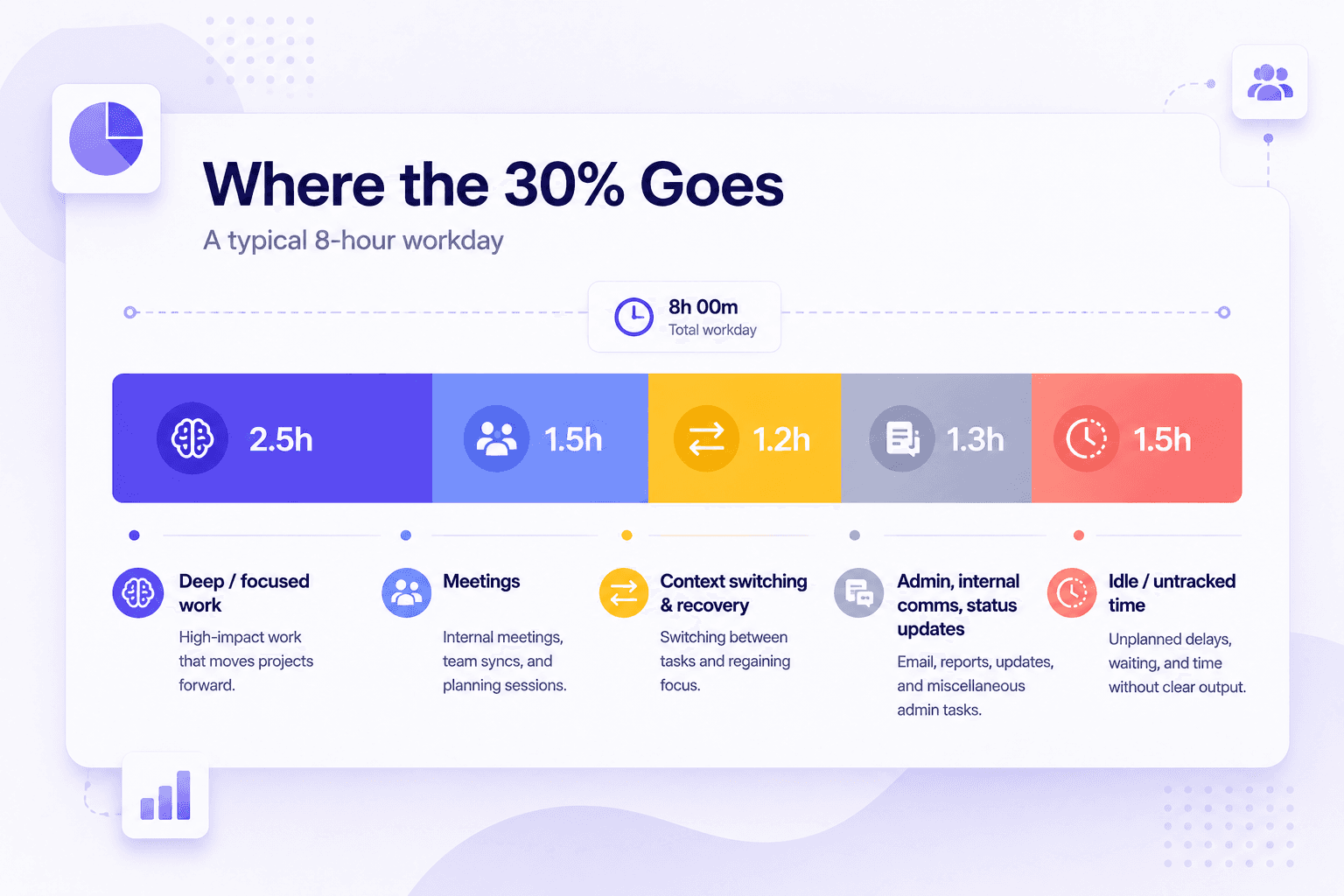
Here's the uncomfortable reality: most teams lose somewhere between 25% and 35% of each workday to time that isn't tracked, isn't noticed, and isn't recovered. That's not an opinion. It shows up in payroll hours vs output. It shows up in the gap between when people clock in and when actual work gets done.
This piece breaks down where that time goes, why it's so hard to see from the manager's seat, and what actually fixes it — not in theory, but in practice.
TL;DR
- The biggest sources of workday waste are invisible on most dashboards: context switching, untracked idle time, back-to-back meeting recovery, and unclear task ownership.
- Managers rarely see the problem because they're looking at hours logged, not hours used.
- The fix isn't stricter policies — it's visibility. When teams see their own patterns, output improves on its own.
- The right time tracking tool shows you where time actually goes, per person, per day, without micromanaging anyone.
What "Wasted Time" Actually Looks Like
It doesn't look like employees scrolling social media all afternoon. That's the easy version of the problem, and it's rarely what's actually happening.
Real workday waste looks like this:
A developer spends 45 minutes getting back into a task after a 30-minute standup. A support rep finishes a call, updates three different systems, and then waits 8 minutes for the next ticket to load. An account manager drafts a proposal, waits two days for a review that takes 10 minutes, then resets context to finish it. None of these show up as "wasted time" on any report. They all just look like hours worked.
This is why the 30% number is so counterintuitive. It doesn't come from slacking. It comes from friction, context loss, poor handoffs, and the general overhead that builds up when teams don't have clear visibility into how their days are structured.
The 5 Real Causes of Workday Waste
1. Context switching kills more time than meetings do
Meetings get the blame, but back-to-back context switching is worse. Every time someone shifts from one task to a completely different one — say, from writing code to answering Slack messages to reviewing a doc — there's a recovery cost. Research in cognitive psychology puts this at 15–25 minutes per switch.
Most knowledge workers switch tasks dozens of times per day. At scale, that recovery time adds up to hours, not minutes.
2. Untracked idle time doesn't show up as a problem
On most time tracking dashboards, an employee shows 8 hours logged and the manager moves on. What the dashboard doesn't show is how many of those hours were actually active versus idle. Screenshot-based tracking changes this. When you can see the difference between logged hours and active hours — keyboard activity, app usage, screen captures — you start to understand what's really happening.
3. Meetings don't end when they end
A 1-hour meeting doesn't cost 1 hour. It costs the meeting time plus the wind-down, the notes, the action items, and the time to mentally reload whatever was in progress before. For back-to-back meetings, that reload never happens — and the afternoon becomes reactive rather than productive.
The fix isn't eliminating meetings. It's scheduling them in ways that protect blocks of uninterrupted time around them.
4. Unclear task ownership creates invisible delays
When no one knows exactly who owns the next step, work stalls between handoffs. This is especially bad in remote or shift-based teams where one person goes offline and the next can't pick up where they left off.
A project that should take 3 days takes 5 — not because anyone is slow, but because the handoff friction adds up. Per-task time tracking makes this visible before it becomes a recurring problem.
5. Night shift and shift-based teams carry extra overhead
For teams that work in shifts, there's an additional layer of waste that standard tools don't even try to measure: the handoff between shifts.
When your time tracker splits a night shift across two calendar days, the data is immediately wrong. Managers have to reconcile timesheets manually. Hours get double-counted or dropped. That reconciliation work — every Monday, every payroll cycle — is a direct cost that most operations teams have just accepted as normal.
It's not normal. It's fixable.
Why Most Managers Don't See It
The default response to "we're not being productive enough" is to ask for more status updates. More standups. More reporting. This makes the problem worse, not better — because now your team is spending more of their limited productive time explaining what they did instead of doing it.
The real gap is visibility, not accountability.
Most managers are looking at hours logged, not hours used. They see a timesheet that says 8 hours and assume it means 8 hours of work. Without data on activity patterns — when is your team most productive, how much of each day is idle, which projects are burning hours without delivering output — you can't make good scheduling decisions.
You end up guessing. And the waste continues.
How to Actually Fix It (Without Micromanaging Your Team)
The solution isn't surveillance. Teams that feel watched without purpose disengage fast, and disengagement is its own productivity killer.
The goal is visibility — for you and for your team. When people can see their own patterns, most of them self-correct. When managers can see where time is actually going, they can make structural changes that help rather than just applying pressure.
Here's what that looks like in practice:
See active hours, not just logged hours
A time tracker that captures keyboard and mouse activity, app usage, and random-interval screenshots gives you the difference between "present at desk" and "actually working." This isn't about catching people out. It's about knowing where your baseline is so you can see what moves the needle.
Horaflow shows a productivity score per employee per day — built from activity signals, not guesswork. When you can see that a team member's active hours drop every Tuesday afternoon, you can ask a useful question instead of a pointless one.
Identify your team's real peak hours
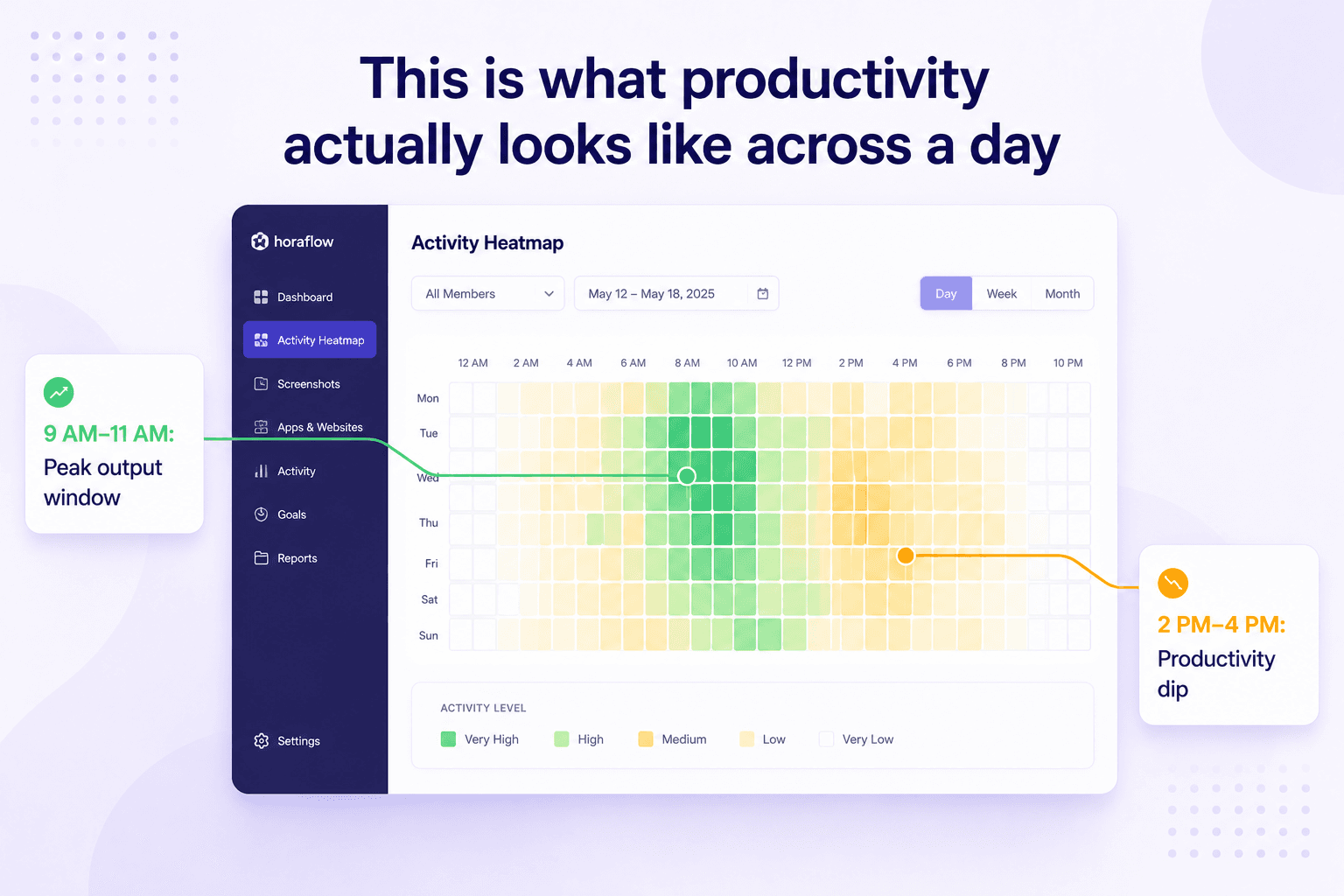
The activity heatmap in Horaflow shows you hour-by-hour productivity patterns across your whole team. Some teams peak hard between 9 and 11 AM and go quiet after 2 PM. Others hit a second peak after 7 PM. Night shift teams have completely different rhythms.
Once you know your team's actual patterns, you can protect peak windows for deep work and push meetings, reviews, and admin tasks to the lower-energy parts of the day. This alone can recover 45–90 minutes of real output per person per day.
Track time per project and task, not just per day
When you can see how many hours actually went into a client project — per person, per task — you can have a real conversation about why it took longer than estimated. Not a blame conversation. A process conversation.
Project-level time data tells you where your estimates are off, which work types are burning the most hours, and where your team needs better tools or clearer briefs. It's the kind of data that improves the next sprint, not just explains the last one.
Fix the shift problem before it hits payroll
If any part of your team works outside a standard 9-to-5, your time data is probably wrong right now. Most time trackers split overnight shifts across two calendar days, which means Monday's totals are wrong, Tuesday's are wrong, and your payroll team is cleaning it up by hand every week.
Horaflow attributes every hour in a shift to the day the shift started. A 10 PM to 6 AM shift on Monday shows up as Monday hours. That's how it works in the real world, and that's how the data should work too.
Give managers the morning digest, not the manual pull
One of the lowest-effort, highest-return habits for managers is a daily summary of what the team did yesterday. Not a 15-minute standup that eats into morning focus time — an email digest that arrives at 9 AM with attendance, productivity scores, and any idle alerts worth acting on.
Horaflow sends this automatically. You read it with your coffee, make any notes, and get on with your day. That's 15–20 minutes of a standup turned into a 3-minute skim.
The Math on Getting Time Back
This isn't abstract. Here's what recovering even 1 hour per person per day looks like for a real team.
50-person team — 50 hours recovered/day → ~$32,500/month → ~$390,000/year
100-person team — 100 hours recovered/day → ~$65,000/month → ~$780,000/year
200-person team — 200 hours recovered/day → ~$130,000/month → ~$1,560,000/year
What To Do This Week
You don't need a 6-month implementation to start seeing where your team's time is going. Here's a straightforward starting point:
- Pick one team. Don't roll out tracking org-wide from day one. Start with a single team of 10–30 people.
- Run two weeks of baseline data. Let the tool run without changing anything. Look at productivity scores, active vs idle ratios, and where the dead time lives.
- Schedule one conversation per week. Not a policy meeting. A pattern review. "I noticed Tuesday afternoons are low-output for most of the team — what's going on there?"
- Move one meeting. Based on the heatmap, pick one recurring meeting that sits in a peak-output window and move it. Measure output the following week.
- Check your shift data if relevant. If anyone on your team works outside standard hours, verify that the hours in your current tool are landing on the right days. If they're not, that's the first thing to fix.
Frequently asked questions
How much time do teams actually waste per day?
It varies by team and industry, but research on knowledge worker productivity consistently shows that fewer than 3 hours of an 8-hour workday go to focused, uninterrupted work. The rest is split between meetings, context switching, admin tasks, and genuine idle time. The good news is that even recovering 30–60 minutes per person per day makes a measurable difference to output.
What's the difference between "logged hours" and "active hours"?
Logged hours are whatever gets entered into a timesheet or tracked by a clock-in/clock-out system. Active hours are the hours where someone is actually using their computer — keyboard activity, mouse movement, apps running. The gap between the two is where a lot of waste hides. A good time tracker shows both.
Does tracking employee activity actually improve productivity?
When it's done transparently and the data is used to improve processes rather than punish people, yes. Teams that can see their own productivity patterns tend to self-correct. Managers who have real data can make better scheduling decisions instead of adding more meetings and status requests. The key is using the data constructively.
What causes the most workday waste in remote teams?
Context switching and unclear task handoffs are the biggest culprits in remote teams. Without the natural cues of a shared office, it's easy for work to stall between steps without anyone realizing it. Per-task time tracking and clear ownership logs help significantly.
How does Horaflow help reduce workday waste?
Horaflow gives managers and team leads a clear picture of where hours are going — per person, per project, per day. The activity heatmap shows when each person is most productive so you can schedule work around real patterns. Screenshots and productivity scoring show the difference between time logged and time used. And the daily email digest means you don't have to pull reports manually — the summary comes to you.
Is employee monitoring the same as micromanaging?
No — when the data is used well. Micromanaging is checking in constantly, demanding updates, and making every decision yourself. Good monitoring is having the data to spot structural problems (a team getting too many meetings, a project burning hours without output) and fixing them. The goal is fewer interruptions, not more.
How long does it take to set up Horaflow?
Most teams are up and running in under an hour. Bulk-invite your users, send them the desktop agent download link, and the data starts flowing. There's no complex configuration — the defaults work well out of the box.
Does Horaflow work for shift-based teams?
Yes — and it's actually one of the main reasons we built it. Most time trackers split overnight shifts across two calendar days, which means your data is wrong before you've even looked at it. Horaflow attributes every hour to the shift day it belongs to, so your totals are correct and your payroll team isn't cleaning up spreadsheets every Monday.
See where your team's time is actually going.
Horaflow gives you screenshots, productivity scoring, project-level time, and shift-correct attendance — in one dashboard, for one flat price. No per-user upcharges, no add-on fees, no surprises. From $125/mo for up to 100 users. Yearly = 2 months free.
Book a 10-minute demo →